实现一下 用户点击 与promise保存 资源加载失败与js代码报错 上报。
目录结构:
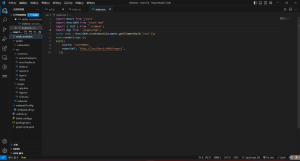
核心的代码实现以及实现思路。
主要考虑将用户的id与请求的url存储在了window上,因为这样比较好操作一些。
但是实际开发中 ,可以使用本地存储的token。
然后请求的话 是使用的navigator.sendBeacon,因为考虑到不支持IE 这里可以使用img标签的方式解决下这个问题
然后要处理的就是click点击事件与报错了
类型定义type.ts
export type Options = {
    userId?: string, // 用户id
    reportUrl: string, // 后端url
    autoTracker?:boolean, // 自动埋点
    errorReport?:boolean, // 是否开启错误监控
}

export enum FIELD{
    userID='$user_id',
    requestUrl='$report_url_'
}
插件的注册:inlit
index.ts
import { loadConfig } from './util';
import { tracker } from './actionTracker';
import { Options } from './type';
/**
 * 初始化配置
 * @param {*} options
 */
function init(options:Options) {
  loadConfig(options);
}
//埋点方式选择
export { init, tracker};
配置初始化 utils.ts
import { autoTrackerReport } from './actionTracker';
import { errorTrackerReport } from './errorTracker';
import { Options,FIELD } from './type';

export function loadConfig(options:Options) {
  const {
    userId,
    reportUrl,
    autoTracker=true, // 自动埋点
    errorReport=true, // 是否开启错误监控
  } = options;

  if (userId) {
    window[FIELD.userID] = userId;
  }
  if (reportUrl) {
    window[FIELD.requestUrl] = reportUrl;
  }
  errorReport && errorTrackerReport();
  autoTracker && autoTrackerReport();

}
异常的上报处理
errorTracker.ts
import { lazyReport } from './report';
export function errorTrackerReport() {
  const originOnError = window.onerror;
  window.onerror = function (msg, url, row, col, error) {
    if (originOnError) {
      originOnError.call(window, msg, url, row, col, error);
    }
    lazyReport('error', {
      message: msg,
      file: url,
      row,
      col,
      error,
      errorType: 'jsError'
    });
  }

  window.addEventListener('unhandledrejection', (error:PromiseRejectionEvent) => {
    lazyReport('error', {
      message: error.reason,
      error,
      errorType: 'promiseError'
    });
  });


  window.addEventListener('error', (error:ErrorEvent) => {
    let target = error.target as any;
    lazyReport('error', {
      message: "加载 " + target?.tagName + " 资源错误",
      file: target?.src,
      errorType: 'resourceError'
    });
  }, true)
}

export function errorCaptcher(error:any, msg:string) {
  lazyReport('error', {
    message: msg,
    error: error,
    errorType: 'catchError'
  });
}
用户点击行为的收集
autoTracker.ts
import { lazyReport } from './report';
/**
 * 手动上报
 */
export function tracker(actionType, data) {
  lazyReport('action', {
    actionType,
    data
  });
}

/**
 * 自动上报
 */
export function autoTrackerReport() {
  document.body.addEventListener('click', function (e) {
    const clickedDom = e.target as any;
    let target = clickedDom?.getAttribute('target-key');
    if (!target)
      return
    lazyReport('action', {
      actionType: 'click',
      data: target
    });
  }, false);
}
测试代码 App.ts
import React, { useEffect } from 'react'
export default () => {
    useEffect(() => {
        new Promise((then, error) => {
          error(()=>{
            return 'promise异常'
          })

        })

    }, [])
    return <div className='main'>
        dsaaSasSAsaSd
        <button target-key='data1111'>点击上报</button>
        {/*资源加载失败上报 */}
        <img src='https://www.cs'/>
    </div>
}
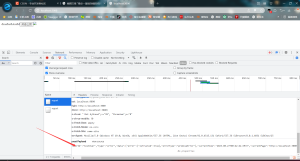
Promise异常
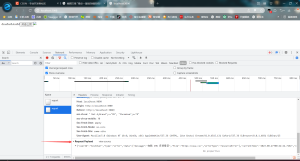
资源加载失败
用户点击上报
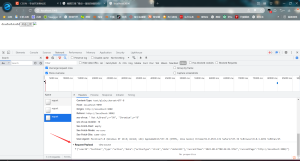
OK
- THE END -


共有 0 条评论