今天又要实现一个需求。。
根据列表返回的结果,如果列表中有一条数据的进度不是百分百就,每隔2秒,轮询重新请求列表数据
因为是基于antd的table自己去封装的portable,所以需要自己去实现轮询
因为封装的portable只能提供了request方法,不支持配置dataSource。
有点坑,不过封装的人其实厉害。
封装的proTable支持的配置项
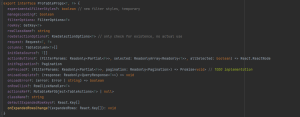
那么实现轮询的思路就是在与request与useEffect,useRef
需求就是,如果返回的列表中的状态部位-1,那么每隔2秒去轮询一次。其实自己考虑到了两种情况,一就是轮询回的数据满足条件,那么这时就需要去停止当前轮询。
2,停止当前轮询后,当我们改变了查询参数
后就应该去重启新一轮的轮询了。
基本思路就是使用useEffect加useRef去实现,
useEffect用来清除上一次的轮询 useRef用来缓存请求的数据,每次做一下对比,和缓存setInterval的id,满足条件时清楚上一次的轮询
useState用来控制开启新一轮的轮询
实现的核心代码
const noticesRef = useRef<number[]>([])
  const timer = useRef<any>()
  const [sendStatisticCount, setSendStatisticCount] = useState<NotifySendCompleteCountDTO[]>()
  const proRef = useTableActionsRef<NotifyInfoDTO>()
  const [companyQuota, setCompanyQuota] = useState<CompanyQuotaDTO>()

  const [polling, setPolling] = useState(() => false)
  const cacheTimerIdRef = useRef(0)//
  const cachePramsRef = useRef({})//

  const changePolling = (requestParms: NotifyInfoDTO) => {
    const parmsKeys = Object.keys(requestParms)
    //请求后端的参数是否变化
    let isEquation = true
    parmsKeys.forEach(item => {
      if (requestParms[item] !== cachePramsRef.current[item])
        isEquation = false
    })

    if (isEquation)
      return

    cachePramsRef.current = requestParms
    setPolling(state => !state)
  }

  const stopCurrentPolling = (parms: Array<NotifyInfoDTO>) => {
    const isSuccess = parms.find(item => item.status !== 1)
    if (!isSuccess)
      clearTimeout(cacheTimerIdRef.current)
  }

  useEffect(() => {
    cacheTimerIdRef.current = setInterval(() => {
      proRef.current?.reload()
    }, 2000)

    return () => clearTimeout(cacheTimerIdRef.current)
  }, [polling])


  const request = useCallback<Request<NotifyInfoDTO, FilterParams>>(
    async ({ status, keyWords }, { page = 1, pageSize = 10 }) => {

      changePolling({
        status: status?.[0]?.state,
        keyWords,
        page,
        size: pageSize
      })//轮询设置

      const res = await NoticeSetting.notifyList<Page<NotifyInfoDTO[]>>({
        type: 2,
        status: status?.[0]?.state,
        keyWords,
        page,
        size: pageSize
      })

      if (isSuccessful(res)) {
        const total = res.data.totalElements
        //是否停止当前的轮询
        stopCurrentPolling(res?.data?.content)
        return {
          data: res.data.content,
          total,
          pagination: {
            pageSize: res.data.pageable.pageSize,
            page: res.data.pageable.pageNumber + 1,
          },
        }
      } else {
        return {
          data: [],
          total: 0,
          pagination: {
            pageSize: 10,
            page: 1,
          },
        }
      }
    }, []
  )
其实还是比较简单的,基础。主要是碰到自己没做过的需求,怎么去解决的思路很重要
- THE END -
非特殊说明,本博所有文章均为博主原创。
如若转载,请注明出处:http://www.cx330.cloud/index.php/2023/07/25/%e5%be%ae%e5%89%8d%e7%ab%af%ef%bc%9f-qiankun/

共有 0 条评论